What is Octoparse AI? How Does It Work? How Is It Different from Octoparse?
These are the questions we hear most often. Here’s a simple breakdown of what Octoparse AI is, what it can do, and how to get started.
What is Octoparse AI?
Octoparse AI is an AI-powered RPA (Robotic Process Automation) tool. Unlike traditional RPA, it lets AI help you build bots, so you don’t have to start from scratch. You can quickly set up workflows that actually run and get work done.
It can help you build bots for:
- Web automation
- Windows desktop apps
- Excel-like file processing
What it can do: Collect web data and handle tasks across systems.
Where it’s useful: Automating recruitment, finance reconciliation, and more.
How it helps: You can create simple end-to-end business workflows or lightweight monitoring systems.
In short, if you have repetitive daily tasks, an RPA bot can take them off your plate—saving time, reducing effort, and letting a “digital worker” do the work for you.
How is Octoparse AI Different from Octoparse?
Both tools are built by our team, but they serve different purposes.
Octoparse
- Focuses on web scraping, quickly extracting large amounts of data.
- Simple, easy to use, and beginner-friendly.
Octoparse AI
- Focuses on full automation.
- Can scrape data too, but goes beyond that:
- Collect data
- Process it with AI
- Automatically update other systems, files, or platforms
Think of Octoparse AI as turning your workflow into a repeatable automation script that handles your routine tasks.

If all you need is data, Octoparse is enough. If you want to automate workflows, Octoparse AI is the better choice.
How to Get Started
a) If You’re Experienced with RPA
You can jump right in—migrating from other RPA tools is straightforward.
- Download: Octoparse AI Studio
- Tutorials: Help Center
b) If RPA Feels Intimidating
No worries—you have two options:
Option 1: Get a developer to help Let a developer or service provider set up workflows for you so it’s ready to go.
- Contact: Reach out via Intercom
Option 2: Learn it yourself
- If you know some coding: Dive into our tutorials and build your own workflows. Advanced users will find it smooth. Join our developer community if you want to contribute!
- Command tutorials: Basic Commands
A Visual Guide to Learning RPA:
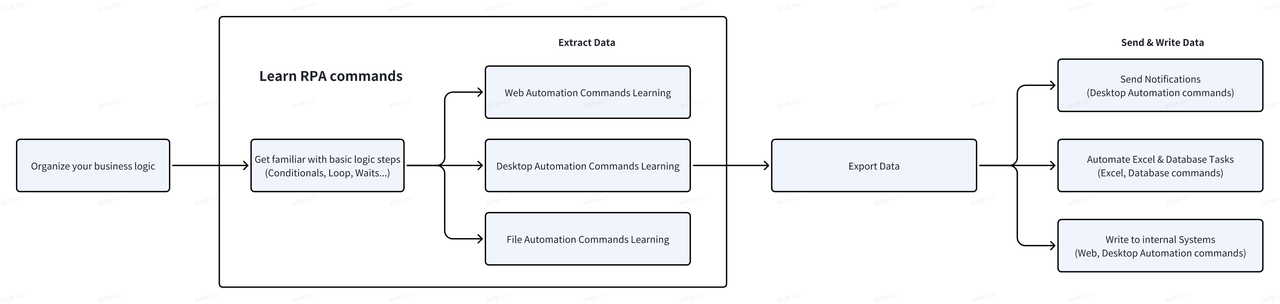
- If you don’t code: Start with AI Copilot, which creates workflows automatically. Begin with simple tasks like opening a webpage, navigating, and collecting data, then grow from there.
- AI Copilot guide: AI Copilot Tutorials
- Quick start for beginners: Get Started
Support for Every User
- If your needs are standardized, widely used by others, and you’re willing to share them on the App Store, feel free to contact us—we can help you build a basic workflow for free.
- Custom workflows? Our support team will guide you step by step. Contact us anytime via Intercom or join our Discord community:
Enterprise Services
If you’d like someone to handle your automation end-to-end, we also offer an Enterprise plan with full support:
- Requirement analysis
- Workflow setup
- Training and onboarding
- Ongoing support
This helps you get started faster and see results sooner. Pricing usually includes a basic account, custom scripts, and customer success services. Contact us via Intercom for details.
Become a Service Provider or Developer
We welcome partners and developers. We provide resources and support so you can explore more RPA scenarios and serve more users.
Octoparse has over 10 years of experience in automation. We not only excel in web scraping but continue to innovate in automation. We believe technology and AI should help more people, especially in areas where large RPA tools don’t reach. Whatever your role or scenario, if you have a need, reach out—we’d love to collaborate.